Your face next to your work.
A screen and camera recorder in one. The round camera view sits on top of your screen. Drag it where you want while you record, and the video shows it in the same place.
Record your screen, your camera and your voice on your Mac. No subscription. No limit on videos or minutes. Up to 4K. Every recording stays on your computer.
$10.99 once. No subscription. macOS 15 or later.
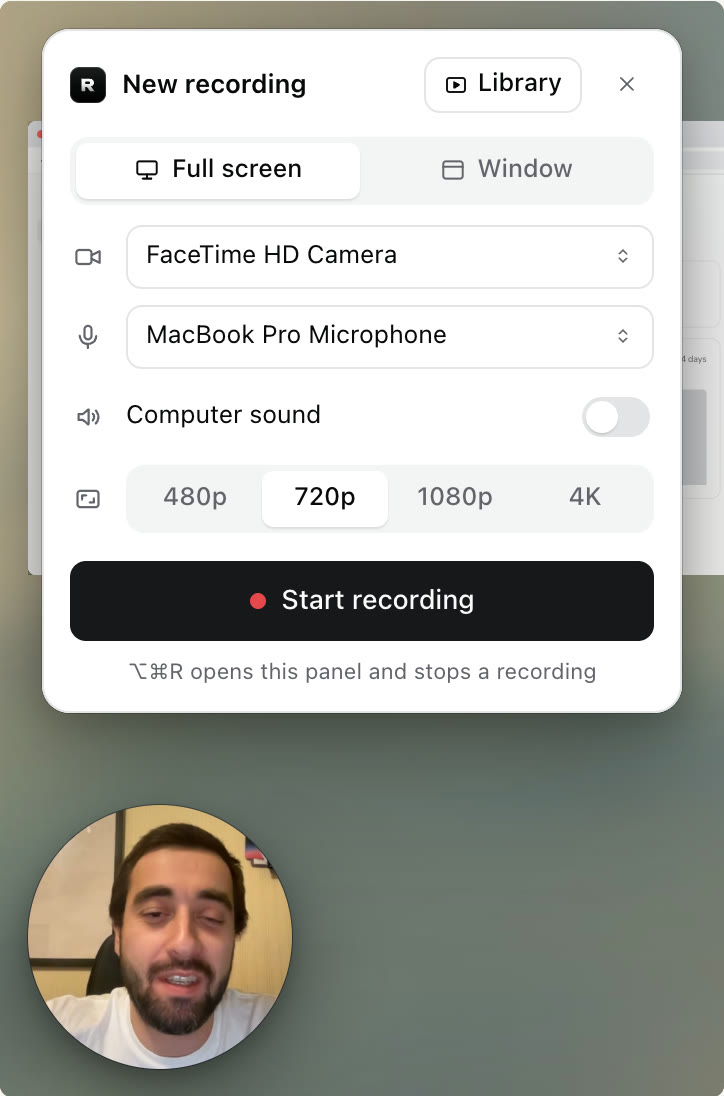
Try it. Click Start recording, then the red stop button. This is the real app, drawn for the web. It does not use your screen or your camera. Try it. Tap Start recording, then the red stop button.
Subscription screen recorders count your videos and your minutes. The free plan of Loom allows 25 videos of 5 minutes each. To record more, you pay for every person on the team, every month. For a video of your own screen.
Record is a screen recorder you buy once. It runs on your Mac, it saves to your Mac, and it does not count anything. Your recordings are yours.
How it works
Step 1
Press ⌥ ⌘ R (Option, Command and R) in any app. The recording panel opens. Choose the full screen or one window, your camera and your microphone.
Step 2
After a 3, 2, 1 countdown, Record captures your screen, the round camera view and your voice. Pause and resume when you need a moment.
Step 3
Press the shortcut again. Record saves an MP4 file and opens it in your library. Click Copy video and paste it into Slack, Mail or any chat.
Features
A screen and camera recorder in one. The round camera view sits on top of your screen. Drag it where you want while you record, and the video shows it in the same place.
4K
Choose 480p, 720p, 1080p or 4K before you record, at 30 or 60 frames per second. Smaller sizes make smaller files.
Record as many videos as you want, as long as you want. The only limit is the free space on your Mac.
One click copies the video. Paste it into Slack, Mail or any chat. You get a small MP4 file that plays everywhere.
Record your microphone and the sound of your computer, together or alone.
The stop control waits at the left edge of your screen. It is never in your video.
Once.
No subscription and no price per user. The app is yours, with the updates that follow. See pricing
Record has no account, no servers and no tracking. Your recordings are files in your Movies folder. Nothing is uploaded, so nobody else can open them.
Record and Loom
Loom is built for teams that share videos by link all day. Record is for people who want to record on a Mac without a monthly bill. This is what each one gives you.
| Topic |  Record | Loom |
|---|---|---|
| Price | $10.99, one payment. Updates included. | Free plan with limits. Business is $18 for each user, each month. |
| Number of videos | No limit. | 25 for each person on the free plan. No limit on paid plans. |
| Length of a recording | No limit. | 5 minutes on the free plan. No limit on paid plans. |
| Picture size | Up to 4K, at 30 or 60 frames per second. | Up to 720p on the free plan. Up to 4K on paid plans. |
| Where videos are stored | On your Mac, in your Movies folder. | On Loom's servers. |
| Account | None. No sign-in. | Needed. |
| Share with a link | Coming next, through your own Google Drive. Today you copy the video and paste it into any chat. | Yes, right after you stop. |
Loom plan details are from loom.com/pricing, read in November 2026. Plans change, so check there for the current ones.
Pricing
One year of Loom Business for one person costs $216. Record costs $10.99 one time, and you can record as much as you want.

The screen and camera recorder. Version 1.0.0.
$10.99one payment
no subscription
One payment of $10.99. You are not charged again. Secure payment by Paddle, our reseller. Terms · Privacy
The film
A short film about recording your screen without a subscription.
The film is not available right now. Try the live demo at the top of the page.
Coming next
These features are in work. They are not in the app today, and they have no dates yet. When they arrive, they are part of the one payment.
Yes, for recording. Record captures your screen, your camera and your voice on a Mac, the way Loom does. It does not have Loom's link sharing, comments or viewer statistics. Sharing with a link from your own Google Drive is coming next. See Record and Loom side by side.
$10.99, paid once. There is no subscription and no price per user. Tax may be added for your country at checkout. See pricing.
No. Record does not count videos or minutes. Your recordings are files on your Mac, so the only limit is the free space on your disk.
No. You pay once and the app is yours, with the updates that follow. Record has no account and no sign-in.
On your Mac, in the folder Movies/Record, as MP4 files. Record has no servers and uploads nothing.
Yes, when your screen has that many pixels. You choose 480p, 720p, 1080p or 4K before you record, at 30 or 60 frames per second. Record never makes the picture bigger than your screen, because that only makes the file larger.
Click Copy video and paste it into Slack, Mail or any chat. You can also click Show in Finder and send the MP4 file the way you like. Sharing with a link from your own Google Drive is coming next.
Screen & System Audio Recording, and Camera and Microphone if you use them. macOS asks for each one the first time. You find them in System Settings > Privacy & Security.
Record needs macOS 15 or later. It runs on Macs with Apple silicon and on Intel Macs.

The screen and camera recorder for Mac with no subscription.
$10.99, one payment. No subscription. macOS 15 or later.